
Bitdefender Total Security vs Norton 360 Deluxe: Which Is Better in 2026?
Choosing between Bitdefender Total Security and Norton 360 Deluxe is one of the hardest decisions in the antivirus market. Both are Editors’ Choice winners from PCMag, both score near-perfect detection rates in independent lab tests, and both protect Windows, macOS, Android, and iOS devices. Yet they are built on fundamentally different philosophies.
Norton 360 Deluxe is the all-in-one mega-suite. It bundles an unlimited VPN, 50GB of cloud backup, dark web monitoring, parental controls, and identity protection into a single subscription. Bitdefender Total Security is the lightweight security specialist. It delivers top-tier malware detection with the lowest system impact of any major suite, plus Scam Protection and cryptomining defense, but its included VPN is limited to 200 MB per day.
In this guide, we compare them across every dimension that matters: malware protection, performance impact, features, pricing, licensing, and long-term value. Whether you are protecting a single gaming PC, a family of five, or a small business workstation, this comparison will help you choose the right security suite for 2026.
Before you buy, it also helps to understand the difference between the license types you’ll encounter. For a broader overview of how retail, OEM, and subscription licenses work, see our Ultimate Guide to Software Licenses in 2026. And if you’re weighing whether to save money on a grey-market key, read Why Buying an Original Software License is Important first.
1. Bitdefender vs Norton at a Glance
Before diving into the details, here is the headline comparison. Both suites are top-ranked by independent labs, but they prioritize different things. If you want a deeper explanation of how perpetual vs subscription licenses work, our Ultimate Guide to Software Licenses explains it clearly.
| Feature | Bitdefender Total Security | Norton 360 Deluxe |
|---|---|---|
| Devices Covered | 5 (individual) or 25 (family) | 5 |
| Platforms | Windows, macOS, Android, iOS | Windows, macOS, Android, iOS |
| Malware Protection Score (AV-Comparatives Mar 2026) | 99.5% | 99.8% |
| Performance Impact (AV-Comparatives Apr 2026) | 9.6 (lighter) | 5.3 (heavier) |
| VPN | 200 MB/day per device | Unlimited data |
| Cloud Backup | Not included | 50 GB |
| Password Manager | Bitdefender SecurePass | Norton Password Manager |
| Parental Controls | Family subscription only | Included |
| Dark Web Monitoring | Not included | Included |
| Scam Protection | Scam Protection (AI-powered) | AI Scam Protection (incl. deepfake detection) |
| First-Year Price (5 devices) | ~$47.50 | ~$49.99 |
| Renewal Price (5 devices) | ~$89.99/year | ~$124.99/year |
| Money-Back Guarantee | 30 days | 60 days |
2. Malware Protection: Independent Lab Results
Both Bitdefender and Norton are regularly tested by AV-Comparatives, AV-TEST, and SE Labs, three of the most respected independent security testing organizations. The short answer: both are outstanding, and the gap between them is statistically insignificant.
In AV-Comparatives’ Malware Protection Test for Enterprise (March 2026), Norton scored 99.8% against 1,000 recent malware samples, while Bitdefender scored 99.5%. Both had zero false alarms on common business software. In the same lab’s Real-World Protection Test (March to April 2026), Bitdefender blocked 100% of tested threats, and Norton blocked 99.5%.
AV-TEST’s June 2026 round awarded Bitdefender Total Security full marks in protection, performance, and usability for Windows 11 home users. Norton has consistently earned top scores across AV-TEST, AV-Comparatives, and SE Labs throughout 2026.
In practical terms, both suites will protect you from the vast majority of malware, ransomware, phishing attempts, and zero-day threats. You are not choosing between a good product and a bad one. You are choosing between two excellent products with different strengths elsewhere.
3. Performance Impact: Which Suite Is Lighter?
This is where the two suites diverge sharply. Bitdefender is significantly lighter on system resources than Norton.
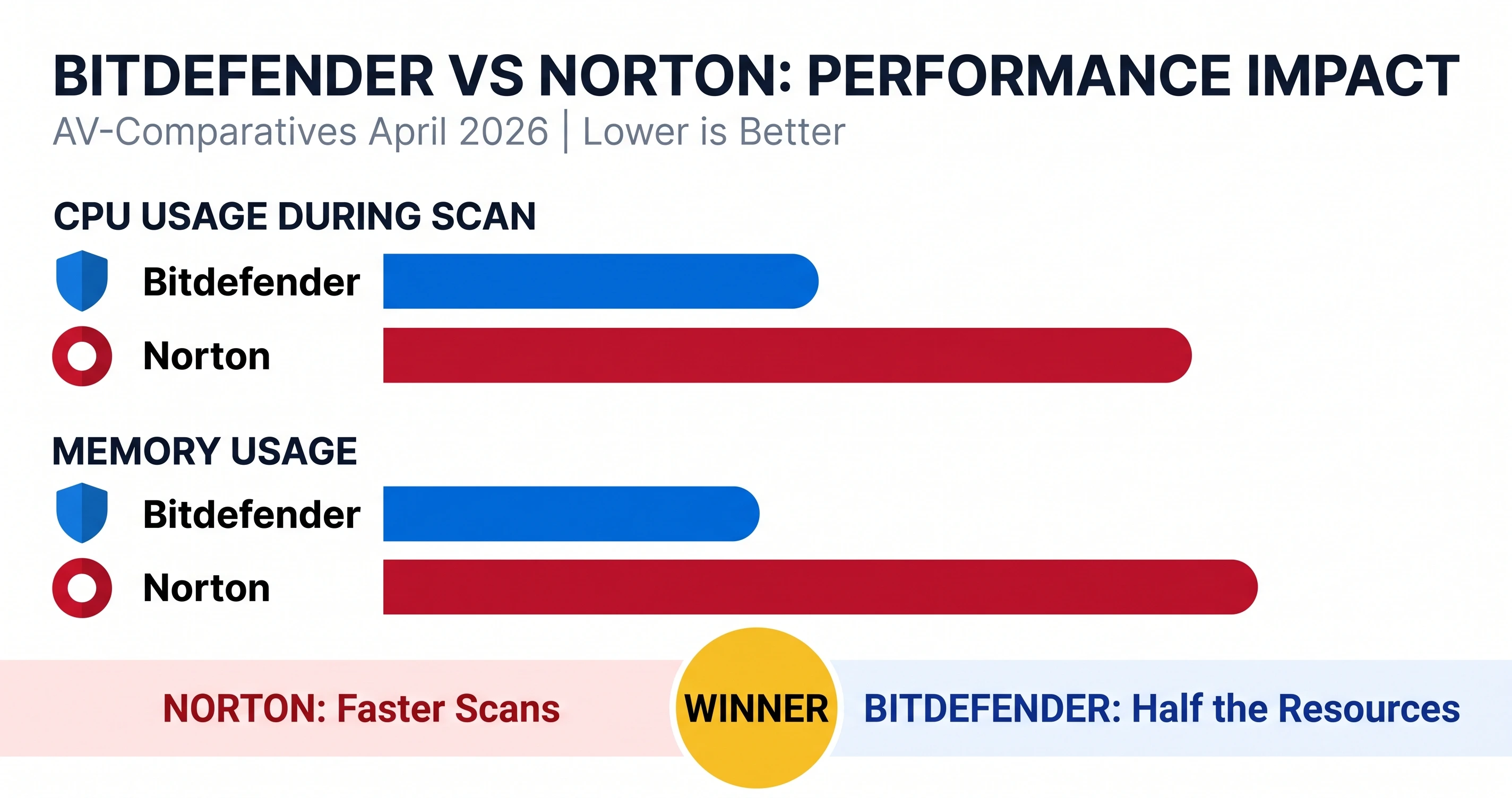
AV-Comparatives’ April 2026 Performance Test rated Bitdefender at 9.6 and Norton at 5.3 on a scale where lower is better. This means Bitdefender has a measurably smaller impact on system speed during scans, file copying, application launches, and other common tasks.
Gizmodo’s independent testing confirmed this. During a full system sweep on Windows 11, Bitdefender held peak CPU usage to 11% and memory to 183 MB. Norton’s CPU peaked at 23% with memory at 384 MB. Norton did complete a full scan faster (13 minutes 22 seconds vs. Bitdefender’s slower scan time), but it used roughly twice the resources to do so.
If you are using an older PC, a budget laptop, or a machine that is already resource-constrained, Bitdefender is the better choice. You can buy a genuine Bitdefender Total Security license here for a lightweight, high-performance install. If you have a modern high-end desktop and prefer faster scan completion, Norton’s resource usage is less of a concern. Grab a Norton 360 Deluxe license instead.
4. Features Compared: VPN, Backup, Password Manager, and More
This is where Norton 360 Deluxe pulls ahead for many users. It is a true all-in-one suite, while Bitdefender Total Security focuses more narrowly on core security. If you specifically want Bitdefender’s lighter footprint without the extra services, the Bitdefender Internet Security 3 PCs tier is a strong middle ground.
VPN: Norton Wins Decisively
Norton 360 Deluxe includes an unlimited-data VPN. Bitdefender’s included VPN is capped at 200 MB per day per device. If you plan to use a VPN for streaming, torrenting, or regular privacy protection, Norton’s unlimited VPN is a major advantage. Bitdefender does offer a standalone unlimited VPN subscription, but it costs extra.
Cloud Backup: Norton Includes 50GB
Norton 360 Deluxe includes 50GB of cloud backup, which is enough for documents, photos, and small media files. Bitdefender Total Security does not include cloud backup in any tier. If backup is important to you, this is another point for Norton.
Password Manager: Both Included
Both suites include a password manager. Bitdefender offers SecurePass, and Norton offers its own Norton Password Manager. Both are capable, cross-platform, and integrate with the main dashboard. Neither is as full-featured as a dedicated standalone password manager like 1Password or Dashlane, but they are sufficient for most users.
Parental Controls: Norton Included, Bitdefender Paywalled
Norton 360 Deluxe includes comprehensive parental controls out of the box. Bitdefender reserves parental controls for its family subscription tier, which covers up to 25 devices and costs more. If you need parental controls for a family of 3 to 5 devices, Norton is the better value.
Dark Web Monitoring: Norton Included
Norton 360 Deluxe includes dark web monitoring, which scans dark web forums and marketplaces for your email addresses, credit card numbers, and other personal information. Bitdefender Total Security does not include dark web monitoring. This feature is part of Norton’s broader identity protection push.
Scam Protection: Both Strong
Both suites have invested heavily in scam protection. Bitdefender includes Scam Protection with AI-powered detection of fraudulent websites and messages. Norton includes AI-powered Scam Protection with deepfake detection, Safe SMS, and Safe Web. Both are effective against phishing and social engineering attacks.
Cryptomining Protection: Bitdefender Exclusive
Bitdefender Total Security includes cryptomining protection on Windows, which blocks malicious scripts that hijack your CPU or GPU to mine cryptocurrency. Norton does not offer this feature. If you are concerned about cryptojacking, Bitdefender has an edge.
| Feature | Bitdefender Total Security | Norton 360 Deluxe |
|---|---|---|
| Antivirus & Ransomware Protection | Yes | Yes |
| Firewall | Yes | Yes |
| VPN | 200 MB/day per device | Unlimited data |
| Cloud Backup | No | 50 GB |
| Password Manager | Yes (SecurePass) | Yes |
| Parental Controls | Family tier only | Yes |
| Dark Web Monitoring | No | Yes |
| Scam Protection | Yes (AI-powered) | Yes (AI + deepfake detection) |
| Cryptomining Protection | Yes (Windows) | No |
| Webcam Protection | Yes | Yes (Windows only) |
| Anti-Spam | Yes | Yes |
| Cross-Platform | Windows, macOS, Android, iOS | Windows, macOS, Android, iOS |
5. Pricing and Renewal Costs
First-year pricing for both suites is competitive, but renewal prices tell a very different story. Norton is notorious for steep renewal increases, while Bitdefender’s renewal is more moderate.
| Plan | Bitdefender Total Security | Norton 360 Deluxe |
|---|---|---|
| First Year (Promotional) | ~$47.50 | ~$49.99 |
| Renewal (Year 2+) | ~$89.99/year | ~$124.99/year |
| Money-Back Guarantee | 30 days | 60 days |
| Free Version Available | Yes (Bitdefender Antivirus Free) | No |
Norton’s first-year price is attractive, but the $124.99 renewal is a 150% increase over the promotional rate. Bitdefender’s renewal at ~$89.99 is still an increase but less dramatic. Norton’s 60-day money-back guarantee is more generous than Bitdefender’s 30 days, which gives you more time to evaluate it.
A smart strategy for either product: buy at the promotional first-year rate, then cancel auto-renewal before the renewal date and purchase a new license from an authorized reseller. This is a common practice among savvy buyers and is perfectly legitimate. For a full breakdown of how to evaluate licensing costs across software categories, see our Ultimate Guide to Software Licenses.
6. Licensing and Activation: How Each Works
Both Bitdefender and Norton use account-based licensing, which is good news for anyone who upgrades hardware frequently. Unlike OEM Windows licenses, which are bound to the first motherboard, antivirus licenses can be moved between devices as long as you stay within your device count. If you want to understand the full spectrum of license types (retail, OEM, volume, and subscription), see our Ultimate Guide to Software Licenses.
Bitdefender Activation
Bitdefender licenses are managed through Bitdefender Central (central.bitdefender.com). To activate:
- Sign in to Bitdefender Central with your account.
- Go to My Subscriptions.
- Click Activate Your Subscription.
- Enter your activation code and click Activate.
Once activated, you can install Bitdefender on any device by signing in to the same account. The activation code only needs to be entered once. To move your license to a new PC, simply uninstall Bitdefender from the old device and install it on the new one.
Norton Activation
Norton licenses are managed through your Norton account. To activate:
- Go to norton.com/enroll in a web browser.
- Enter your 25-character product key.
- Click Next and follow the on-screen instructions.
Alternatively, you can sign in to your Norton account and enter the key from your subscription dashboard. Norton will guide you through installation on your devices. Like Bitdefender, Norton licenses are not hardware-bound, so you can transfer them between devices.
7. Which One Should You Buy?
There is no single “better” product here. Both are excellent, and your choice should depend on your priorities.
Choose Bitdefender Total Security if:
- You have an older or budget PC and need the lightest possible system impact.
- You want top-tier malware detection without paying for features you will not use.
- You are concerned about cryptomining attacks and want dedicated protection.
- You prefer a simpler, set-and-forget security suite.
- You want a lower renewal price and more predictable long-term costs.
Buy a Genuine Bitdefender Total Security License
Choose Norton 360 Deluxe if:
- You want an all-in-one suite with VPN, cloud backup, and parental controls.
- You need an unlimited VPN for streaming, travel, or daily privacy.
- You want dark web monitoring and identity protection features.
- You are protecting a family and need comprehensive parental controls.
- You value a 60-day money-back guarantee and are willing to manage renewal pricing.
Buy a Genuine Norton 360 Deluxe License
For most individual users with a modern PC who want strong protection without extra services, Bitdefender Total Security is the better value. For families and anyone who wants VPN, backup, and parental controls bundled in, Norton 360 Deluxe is the more complete package.
If you need to replace an expired or revoked antivirus license today, choose from our verified, activation-supported licenses:
- Buy a Genuine Bitdefender Total Security License: top-tier malware protection with the lightest system impact.
- Buy a Genuine Norton 360 Deluxe License: all-in-one security with unlimited VPN, 50GB backup, and parental controls.
- Buy a Bitdefender Internet Security License: essential protection for Windows without the extras.
- Buy a Norton 360 Premium License: cover up to 10 devices with full VPN, backup, and parental controls.
Ready to Protect Your Devices with a Genuine License?
Get a verified Bitdefender or Norton license delivered to your inbox in minutes, with full activation support and a replacement guarantee.
Buy Genuine Antivirus Licenses OnlineFrequently Asked Questions (FAQ)
Is Bitdefender better than Norton in 2026?
It depends on your priorities. Bitdefender Total Security offers top-tier malware detection with the lightest system impact, making it ideal for older or budget PCs. Norton 360 Deluxe provides a more comprehensive feature set with an unlimited VPN, 50GB cloud backup, dark web monitoring, and parental controls, making it better for families and users who want an all-in-one security suite.
Which has better malware protection, Bitdefender or Norton?
Both deliver near-perfect protection. In the AV-Comparatives March 2026 Malware Protection Test, Norton scored 99.8% and Bitdefender scored 99.5%. In AV-TEST’s June 2026 round, Bitdefender earned full marks in protection, performance, and usability. The difference is negligible in real-world use.
Does Bitdefender slow down your computer more than Norton?
No. Bitdefender actually has a lighter system impact. AV-Comparatives’ April 2026 performance test rated Bitdefender at 9.6 and Norton at 5.3 on a scale where lower is better. Gizmodo’s independent testing found Bitdefender held peak CPU to 11% and memory to 183 MB during a full sweep, while Norton used more resources.
Can I transfer my Bitdefender or Norton license to a new computer?
Yes. Both Bitdefender and Norton subscriptions are account-based, not hardware-bound like OEM Windows licenses. You can deactivate the software on an old device and activate it on a new one, provided you remain within your device limit. Bitdefender uses Bitdefender Central, and Norton uses your Norton account dashboard for license management.
Which is cheaper, Bitdefender Total Security or Norton 360 Deluxe?
First-year promotional pricing is similar: Norton 360 Deluxe often starts at $49.99/year for 5 devices, while Bitdefender Total Security starts around $47.50/year for 5 devices. However, renewal prices are higher for both. Norton 360 Deluxe renews at $124.99/year, while Bitdefender’s renewal is typically lower at around $89.99/year. Always check the renewal price before subscribing.
Does Norton 360 Deluxe include a VPN?
Yes. Norton 360 Deluxe includes an unlimited-data VPN. This is one of its key advantages over Bitdefender Total Security, which limits its included VPN to 200 MB per day per device. If you need a VPN for streaming or frequent use, Norton’s unlimited VPN is a significant benefit.
Which security suite is better for families?
Norton 360 Deluxe is generally better for families. It includes comprehensive parental controls, 50GB of cloud backup, and dark web monitoring. Bitdefender offers parental controls only on its family subscription tier, which costs more and covers up to 25 devices. For a family of 5 with mixed devices, Norton 360 Deluxe is the more complete out-of-the-box solution.
Can I buy Bitdefender or Norton from a third-party reseller?
Yes, but only from authorized resellers. Grey-market sites like G2A and Kinguin often sell licenses sourced from fraudulent chargebacks or volume-license leaks, which can be revoked at any time. Buy from a reseller that publishes a clear refund policy, delivers keys via encrypted email, and offers activation support. At LicensesVault, every license is sourced from authorized channels and backed by a replacement guarantee. For a deeper look at the risks of grey-market keys, read our guide on Why Buying an Original Software License is Important.
How do I activate Bitdefender Total Security?
Sign in to Bitdefender Central at central.bitdefender.com, go to My Subscriptions, click “Activate Your Subscription,” enter your activation code, and click Activate. Once activated, you can install Bitdefender on your devices and manage them from the Central dashboard. The activation code only needs to be entered once.
How do I activate Norton 360 Deluxe?
Go to norton.com/enroll in a web browser, enter your 25-character product key, click Next, and follow the on-screen instructions. You can also sign in to your Norton account and enter the key from your subscription dashboard. Once activated, Norton will guide you through installation on your devices.
Do Bitdefender and Norton offer refunds?
Yes. Bitdefender offers a 30-day money-back guarantee on most plans. Norton offers a 60-day money-back guarantee, which is one of the longest in the industry. Both guarantees apply to direct purchases from the official websites. If you buy from a third-party reseller, check their refund policy separately.
Which suite has better phishing and scam protection?
Both excel at phishing protection. Bitdefender includes Scam Protection with AI-powered detection, and Norton includes AI-powered scam protection with deepfake detection, Safe SMS, and Safe Web. Independent lab tests rate both highly, and neither has a decisive advantage in anti-phishing effectiveness.